TLDR
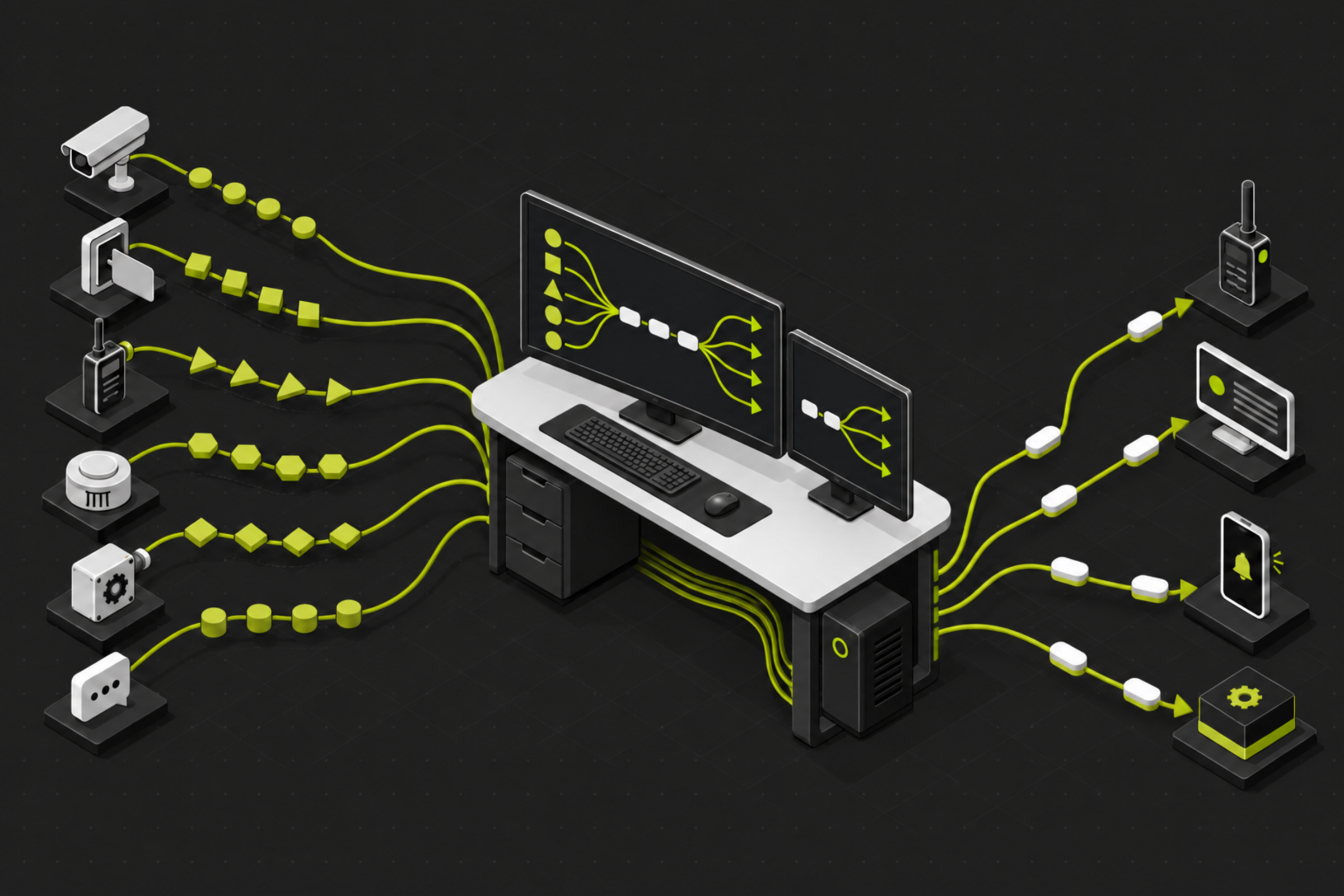
Teldio Fabric connects with more than 200 systems across video management, access control, radio, fire and life safety, intrusion, intercom, industrial/OT, building, and messaging, either natively or through supported protocols. It supports multi-vendor environments and is not limited to Avigilon or Motorola systems. Teldio confirms exact compatibility and workflow depth during technical scoping.
The question behind every integration project
A common first-call question is simple: can Teldio Fabric work with the systems a customer already runs? The answer begins with the outcome the customer needs to achieve. The integrator then identifies the event that starts the workflow, the context that accompanies it, and the action that another system or team must take.
Teldio Fabric is designed for multi-vendor environments. It connects supported systems as an interoperability and workflow layer, normalizes vendor-specific events, and coordinates approved actions. The video management, access control, radio, fire, industrial, or messaging platform remains the system of record for its respective function.
This distinction matters because “integration” can describe very different capabilities. One project may need Teldio Fabric to receive an event and route a notification. Another may require bidirectional commands, acknowledgments, video context, or escalation logic. Product version, licensing, available APIs, authentication, deployment architecture, and the confirmed integration scope determine what Teldio Fabric can do.
What Teldio Fabric connects
The Teldio Fabric integration ecosystem spans video management, access control, radio and dispatch, fire and life safety, intrusion, intercom, industrial and building systems, sensors, and cloud messaging. Teldio Fabric connects with more than 200 systems, either natively or through supported protocols. Representative production examples include Avigilon Unity Video, Motorola MOTOTRBO, Honeywell Pro-Watch, and Gallagher Command Center; this is not a complete integration list. Teldio confirms the supported events, commands, versions, and licensing for each project.
Teldio Fabric also connects through supported standards such as MQTT, OPC UA, CIP/EtherNet/IP, SNMP, REST and SOAP APIs, TCP/UDP, Syslog, and Modbus. These protocols create integration paths across modern software, industrial controllers, IoT devices, and some legacy environments. Protocol availability establishes a starting point; technical scoping confirms whether it exposes the data and commands the workflow requires.
How the integration architecture works

Teldio Fabric uses vendor, integration, and protocol modules to connect systems at the appropriate layers. Its event pipeline follows four stages: ingest, normalize, transform, and route.
A module ingests a supported event from a connected system. Teldio Fabric maps the available event, device, and location details to a consistent schema. The Behavior Engine evaluates an organization-defined rule, including configured conditions, branching, delays, and error handling. Teldio Fabric then routes the approved action to the designated system or team.
The modular architecture also separates connector logic from the rest of the workflow. When a vendor changes an API, authentication method, or firmware interface, the integration team can address the affected module boundary and validate the workflow through change control. Decoupling reduces point-to-point dependencies, while testing remains essential after vendor or configuration changes.
Software integrations and physical connections
Teldio Fabric is a software-based platform that supports Windows or Linux deployments at the edge, on-premises, or in a hybrid architecture. Supported software and API integrations can operate without dedicated Teldio hardware.
When a workflow depends on wired, serial, dry-contact, cabled-radio, or certain legacy connections, Teldio confirms the approved connection method and architecture during technical scoping. Those requirements remain distinct from Teldio Fabric’s software and API integration layer.
From an Avigilon event to a radio workflow
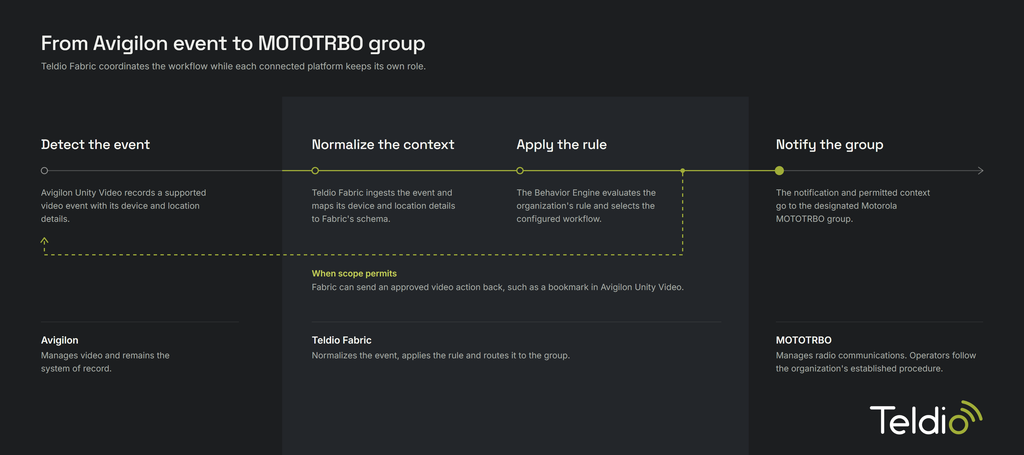
Consider a supported event from Avigilon Unity Video. Teldio Fabric ingests the event, maps its available device and location details to the normalized schema, and evaluates the hospital-, campus-, or enterprise-defined Behavior Engine rule. The configured workflow can then route a supported notification to the designated Motorola MOTOTRBO group. Where the confirmed integration scope permits, it can also coordinate an approved video action such as creating a bookmark.
Avigilon Unity Video continues to record and manage the video event, and the radio system continues to manage radio communications. Teldio Fabric coordinates the downstream workflow and delivers the responsible team the permitted context. Operators and responders use that information to follow the organization’s established procedure.
Why compatibility requires technical scoping
A public ecosystem overview can show breadth, but it cannot serve as a compatibility matrix for every product release and workflow. A dependable scope identifies the exact systems and versions, available licenses, API or SDK access, authentication requirements, event types, required commands, network zones, deployment model, failure behavior, logging requirements, and ownership of ongoing support.
Teldio uses that information to determine whether the project uses a shipping module, a supported protocol-level connection, or a separately scoped integration. This gives the integrator and the customer a clear definition of what data enters Teldio Fabric, which rules apply, which actions leave it, and how the complete workflow will be tested.
Start with the outcome you want to drive and the workflow you need to connect
Teldio Fabric gives integrators a consistent way to connect supported systems, normalize their events, and coordinate approved actions across a multi-vendor environment. The most useful starting point is the operational outcome: define what should happen, which source event triggers it, what context is required, who or what receives the action, and which system remains authoritative.
Talk to Teldio about the outcome your customer needs to achieve and the systems required to support it with Teldio Fabric.
FAQ
Do I need Avigilon or Motorola products to use Teldio Fabric? No specific vendor stack is a technical prerequisite. Teldio Fabric supports multi-vendor environments through confirmed modules, APIs, and protocols. Exact compatibility depends on the systems, versions, licensing, architecture, and required workflow.
What protocols does Teldio Fabric support? Published examples include MQTT, OPC UA, CIP/EtherNet/IP, SMTP, SNMP, REST and SOAP APIs, TCP/UDP, Syslog, and Modbus. Teldio confirms the appropriate protocol and available workflow depth during technical scoping.
Can Teldio Fabric send actions back to connected systems? Yes. Teldio Fabric supports bidirectional workflows, provided the connected module, product version, licensing, permissions, and approved integration scope allow the required action.
Does every integration require the Teldio Edge Gateway? No. Supported software and API integrations can run without dedicated Teldio hardware. For wired, serial, dry-contact, cabled-radio, and certain legacy connections, Teldio confirms the approved architecture and connection method during technical scoping.