
For Environmental Health and Safety Managers
TL;DR
Manufacturing plants can automate lone-worker check-ins by using Teldio Fabric to receive supported check-ins or radio safety events, apply approved rules, notify designated responders, and escalate unacknowledged exceptions. Teldio TruFleet can add authorized radio-location context when the deployment supports it. The employer’s working-alone policy still governs hazard assessment, check-in timing, training, rescue procedures, and the human decisions required during a response.
A worker completing maintenance rounds in a remote pump room or on an elevated conveyor may spend long periods outside direct view of a camera or a colleague. A scheduled radio call can confirm contact, but the process depends on someone remembering the interval, noticing a missed check-in, locating the worker, and starting the approved response process.
For an Environmental Health and Safety Manager, the requirement is a documented program that defines who checks in, when contact is expected, who receives an exception, and what happens next. Automation can support that process without treating a location update or missed call as proof of a worker’s condition.
Why Do Manual Lone-Worker Check-Ins Break Down?
The Canadian Centre for Occupational Health and Safety recommends establishing a check-in procedure, defining how often contact occurs, identifying a primary contact and backup, and creating an emergency plan for a missed check-in. Requirements vary by jurisdiction, so each organization must confirm the rules that apply to its workers and sites.
However, this manual process becomes increasingly fragile when a worker is busy, the radio channel is occupied, responsibilities change during a shift, or the check-in log is incomplete. Only the person who expected it may see the missed call. If that person is unavailable, the exception can remain unresolved.
Automation can monitor the approved check-in process and notify the designated responder when an expected check-in is missed. The working-alone policy still defines the hazard assessment, check-in interval, communication method, training, rescue procedure, and human decisions that govern the response. Further, if others do not acknowledge this type of event, a secondary escalation automation can bring in other stakeholders through processes like a phone call, SMS, loudspeaker message, or more.
Which Events Should Start a Lone-Worker Workflow?
Before implementing any automated process, an EHS team should approve each participating event source and its assigned response. Teldio Fabric automated workflows rely on the event type and data the originating system supplies. Depending on the confirmed systems and integration scope, a workflow may begin with:
- A scheduled check-in exception from a supported lone-worker application or communication system.
- A supported radio safety event from a properly configured device and network, using the event classification supplied by the originating system.
- A geofence or zone event associated with an authorized radio user.
- An approved threshold or alarm from a supported environmental, building, or industrial system.
The originating system remains responsible for detecting, classifying, and recording its native event. Teldio Fabric then uses the supported event data supplied by that system and applies the approved workflow. For radio safety events, the customer should confirm the available event classification and response path during technical scoping. A missed check-in indicates that the response procedure should begin; it does not establish why contact was missed.
How Does an Automated Check-In Workflow Operate?
Consider a worker assigned to an isolated maintenance zone during a high-heat period. The site’s approved procedure requires check-ins at defined intervals of every 5 minutes. If the supported check-in source records a missed check-in after the approved grace period, Teldio Fabric receives the exception and normalizes the available worker or radio identifier, timestamp, and zone information for other systems, including other radios, video, and incident reporting systems.
The Teldio Fabric Behavior Engine applies the organization-defined rule and routes the approved message to the designated supervisor, control room, or response group through supported channels. If the required acknowledgment is not returned within the configured interval, Teldio Fabric can advance to the next approved recipient or action.
When Teldio TruFleet is deployed with compatible Motorola MOTOTRBO or Wave PTX radios, it can add the worker’s available radio location or zone context. Responders use that information alongside the site plan, radio contact, visual checks, and established emergency procedures.
Where Do Teldio Fabric and Teldio TruFleet Fit?
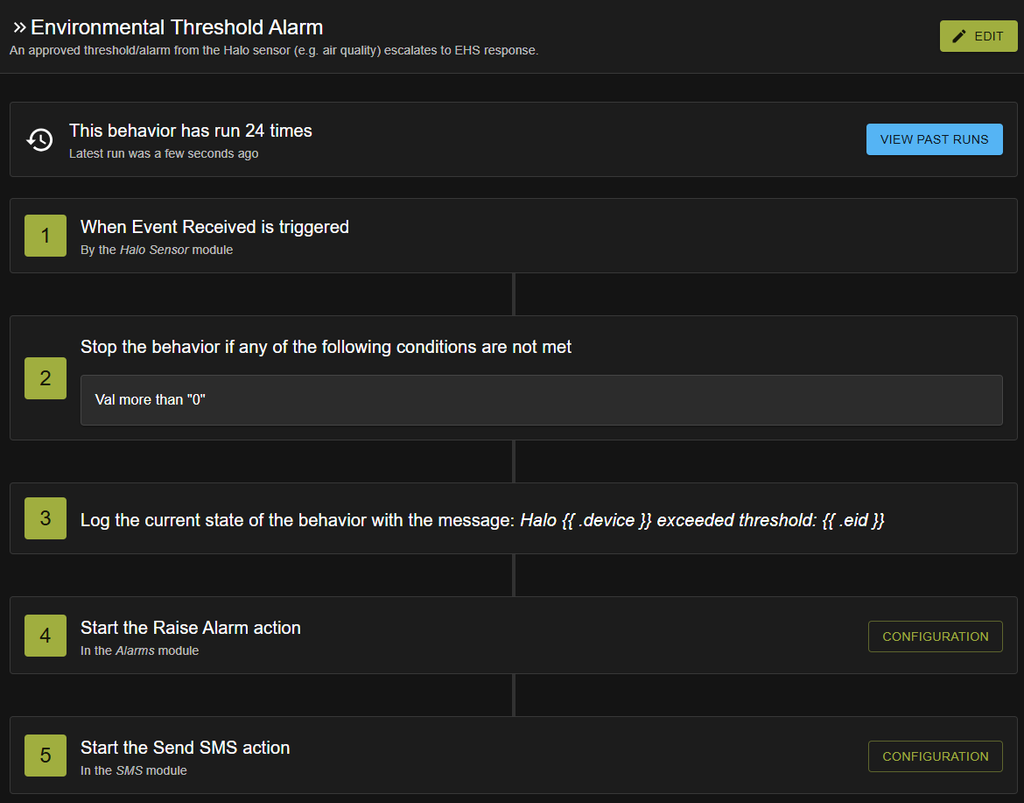
For a lone-worker workflow, Teldio Fabric receives a supported check-in or radio safety event, applies the approved rule, routes the notification to the designated recipient, and records the workflow activity.
With compatible Motorola MOTOTRBO or Wave PTX radios and authorized location services, Teldio TruFleet can add available radio location, zone, route history, or geofence context to the response. Which location details are available, and how precisely they represent the radio’s position, depend on configuration, coverage, positioning infrastructure, permissions, and the confirmed architecture. This context supports the approved contact and response procedure; however, it does not confirm the worker’s physical condition.
What Must EHS Define Before Deployment?
Use the written working-alone procedure as the basis for the workflow. EHS, operations, security, IT, labor representatives, and the relevant system stakeholders should confirm:
- Scope: Which workers, tasks, zones, shifts, and hazards require check-ins.
- Timing: The approved check-in interval, grace period, end-of-shift check, and escalation thresholds.
- Ownership: The primary contact, backup contact, response group, and person authorized to close the event.
- Response: The steps for re-contact, dispatch, site access, emergency rescue, and external assistance.
- Evidence: Required timestamped event records, acknowledgments, retention periods, access permissions, and after-action review.
- Failure modes: Radio dead zones, device or network failure, missed shifts, stale assignments, and unavailable responders.
The Teldio Angle
Teldio Fabric can connect supported lone-worker, radio, sensor, and communication events to the escalation path an industrial site has already approved. Teldio TruFleet can add authorized radio-location context where the deployment supports it. The best starting point is always small, though: Begin with one defined worker group, one check-in rule, and one tested response path.
This post is part of a Connected Operations series, pulling insights from the various projects we’ve worked on. Read more on other industries below and/or talk to Teldio about your or your customers’ needs.
Read Beyond the Alarm Panel: Reducing Response Latency in Hospital Emergency Call-Outs here
Read Priority Without More Noise: Routing Critical Nurse Call Events to the Right Staff here
Read Modernize Without Starting Over: A Phased Integration Strategy for Legacy Hospital Security Systems here
Frequently Asked Questions
1. Can an automated workflow replace a working-alone procedure?
No. The employer remains responsible for the hazard assessment, written procedure, training, communication method, response plan, testing, and compliance with applicable requirements.
2. Does Teldio TruFleet confirm that a lone worker is safe?
No. Teldio TruFleet can provide authorized radio-location or zone context when available. A location update does not confirm the worker’s physical condition.
3. Can Motorola radio safety events start a Teldio workflow?
Yes, supported Motorola radio safety events can start a Teldio workflow when the radios, network, source application, licensing, and integration are properly configured. Teldio confirms the available event data and permitted actions during technical scoping.
4. What happens when a check-in is not acknowledged?
Teldio Fabric can apply the configured delay and send the next approved action when the deployment supports acknowledgment data. The company defines the recipients, intervals, stopping condition, and required human response.