
Automating Time Tracking with Door Readers
Connected Operations in Manufacturing | Article 3 of 3
TL;DR
Physical access events can support time tracking when you securely map approved door-reader events to employee records and pass them to an HR platform. Teldio Fabric can coordinate the data flow and exception logic, while the access-control system remains the source for door activity and HR retains authority over payable time.
At the start of a manufacturing shift, employees may badge through a controlled entrance and then wait again at a separate time-clock kiosk. The access-control system records one timestamp. The timekeeping platform records another. When those systems remain separate, Facilities and HR teams inherit the work of reconciling missed punches, inconsistent timestamps, badge exceptions, and supervisor corrections.
For an Industrial Facilities and HR Operations Lead, the problem is not simply the line at the kiosk. It is the lack of an approved connection between the system that records entry and the system that handles timekeeping. A connected workflow can reduce duplicate data capture, but only when access events are treated as inputs rather than automatic proof of hours worked.
Why Separate Access and Timekeeping Records Create Manual Work
Physical access and timekeeping systems answer different questions. Access control determines whether a credential is authorized at a particular reader. An HR or workforce-management platform applies employment rules, records payable time, and supports payroll processes. Both systems may capture timestamps, but those timestamps mean different things and follow different governance.
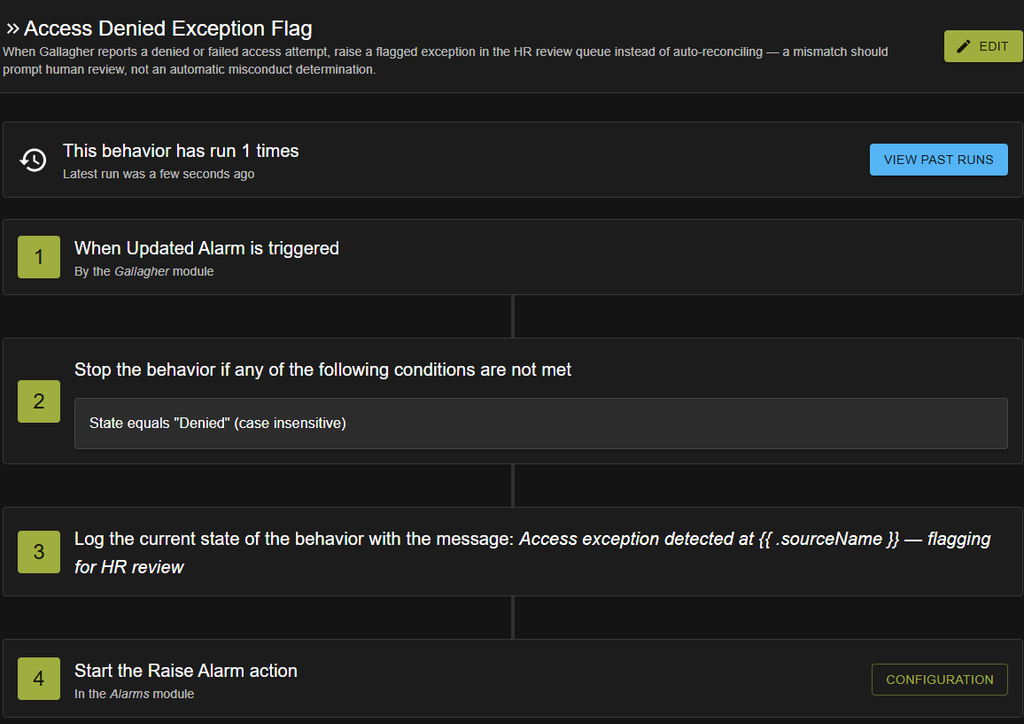
Without an integration, employees may repeat essentially the same action at a door reader and a time clock. If one step is missed, HR may have to compare access logs, schedules, manager notes, and employee submissions before correcting the record. These gaps can also create opportunities for inaccurate entries or inappropriate credential use, although a mismatch should not automatically be treated as misconduct.
Connecting the systems can reduce this reconciliation burden. It does not make the access-control platform the payroll system, and it does not remove the need for exceptions, approvals, or employee review.
What a Door Access Event Can and Cannot Establish
A typical access event can identify a credential, reader, location, timestamp, and result such as access granted or denied. That information can establish that an authorized credential was presented at a defined entry point at a particular time.
Unless another integration is involved, it cannot, by itself, establish when paid work began or ended. An employee may enter before a shift, move between controlled areas, leave for an approved reason, work at another site, forget a badge, or require a manual adjustment. Plants may also have contractors, visitors, shared entrances, emergency exits, and anti-tailgating procedures that produce different records.
The workflow therefore needs a documented rule for which access events can become timekeeping inputs and which must remain security records only.
How an Approved Access to Timekeeping Workflow Can Work
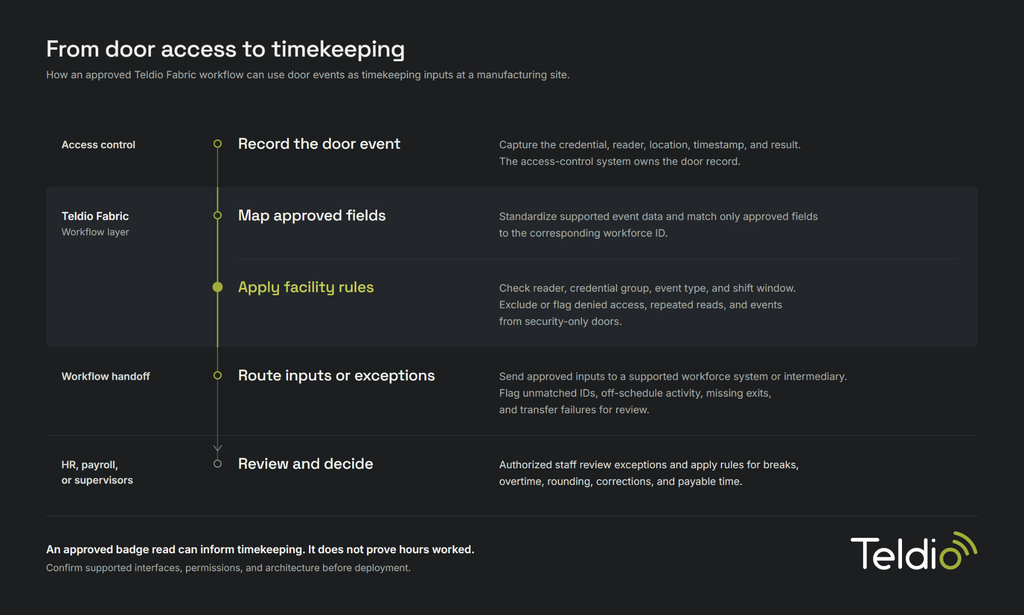
A scoped workflow could connect a supported access-control platform, such as Avigilon Alta, with an HR or workforce-management platform, such as Dayforce. The exact data flow depends on available modules, APIs, permissions, and the customer’s approved architecture.
- Record the access event: The access-control system records the credential, reader, timestamp, location, and event result. It remains the authoritative source for door activity.
- Normalize the relevant fields: Where the required interfaces are supported, Teldio Fabric maps the access event to a consistent structure and associates only the approved fields with the corresponding employee or workforce identifier.
- Apply facility-approved rules: The workflow evaluates defined conditions such as the reader location, credential group, event type, shift window, and duplicate-event interval. Exclude or route denied access, repeated reads, and security-only doors for review.
- Send the approved input or exception: Through a supported interface, the system can pass the resulting event to the appropriate HR, timekeeping, or intermediary system. Unmatched identities, out-of-schedule activity, missing exit events, and transfer failures become visible exceptions rather than silent data gaps.
- Keep final decisions with authorized people: HR, payroll, or designated supervisors review exceptions and apply the organization’s rules for breaks, overtime, rounding, corrections, and payable time. Teldio Fabric coordinates the workflow; it does not determine compensation.
Reduce Duplicate Steps Without Removing Control
In the right operating model, an approved access event may reduce the need for employees to queue at a separate clock-in station. Don’t present that benefit as universal. Some facilities still need kiosks for job-code selection, break declarations, safety attestations, or for employees who don’t use the designated entry point.
A stronger objective is to reduce unnecessary duplicate capture while preserving each department’s required controls. Facilities oversees doors, readers, credentials, and site access. Security retains access-event governance. HR and payroll control workforce policies and final time records. IT manages identity mapping, authentication, data protection, integration health, and failure handling.
What the Project Team Must Confirm
Before implementation, the customer should document:
- which doors and event types are eligible for the workflow
- how access credentials map to employee records
- which system remains authoritative for each data element
- how breaks, overtime, early arrivals, remote work, contractors, and missed badges are handled
- who can review, correct, approve, and audit exceptions
- which data is retained and how long it remains available
- how the workflow complies with applicable employment, privacy, collective-agreement, and records-management requirements
- what happens when a reader, network connection, API, or destination system is unavailable
- how duplicate, delayed, or failed events are detected and reconciled
How Teldio Fabric Fits
Teldio Fabric connects physical security, access control, and enterprise systems through an API-first integration and automation layer. It can ingest supported events, normalize their fields, apply customer-approved logic, and route the resulting action or exception to another authorized system.
Connect the Records Without Confusing Their Purpose
A door reader can provide useful timekeeping evidence, but access and payroll records serve different purposes. Integration adds value by moving the right timestamp into the right governed workflow, quickly identifying exceptions, and reducing avoidable manual reconciliation.
For Facilities and HR leaders, that creates a practical modernization path: connect the systems already in place, define the rules together, and keep employment decisions under authorized control.
This post is part of a Connected Operations series, pulling insights from the various projects we’ve worked on. Read more on other industries below and/or talk to Teldio about your or your customers’ needs.
Read Connected Operations in Healthcare Part 1, Part 2, and Part 3 here.
Read Connected Operations in Manufacturing Part 1 and Part 2 here.